Clash Verge FAQ and Troubleshooting
Clash Verge FAQ
What protocols does Clash Verge support?
Clash Verge supports multiple proxy protocols including:
- Shadowsocks (SS)
- ShadowsocksR (SSR)
- Socks
- Snell
- V2Ray
- Trojan
- HTTPS
Is there a Clash Verge app for Android?
No. Clash Verge / Clash Verge Rev is a desktop app (Windows/macOS/Linux) with no official APK. On Android, use a same-kernel client like FlClash or Clash Meta for Android — your subscription works as-is. See Clash Verge for Android alternatives.
阅读Clash Verge Node Configuration: SS, SSR, V2Ray, Trojan
Node Configuration Guide
Understanding Nodes
Nodes are proxy servers that route your internet traffic through different locations. Clash Verge supports various types of nodes:
Node Types
- Shadowsocks (SS): Encrypted proxy protocol
- ShadowsocksR (SSR): Enhanced version of SS with additional features
- V2Ray: Advanced proxy protocol with multiple transport methods
- Trojan: Protocol designed to bypass deep packet inspection
- HTTPS: Standard HTTPS proxy
Adding Nodes
Method 1: Subscription URL (Recommended)
- Get your subscription URL from your proxy provider
- Open Clash Verge
- Go to Profiles tab
- Click New Profile → URL
- Paste your subscription URL
- Click Download
Method 2: Manual Configuration
- Go to Profiles tab
- Click New Profile → File
- Create a YAML configuration file
- Add your node configurations
Example Configuration
proxies:
  - name: "US Server"
    type: ss
    server: us.example.com
    port: 8388
    cipher: aes-256-gcm
    password: your_password

  - name: "UK Server"
    type: trojan
    server: uk.example.com
    port: 443
    password: your_password
    sni: uk.example.com

proxy-groups:
  - name: "Proxy"
    type: select
    proxies:
      - "US Server"
      - "UK Server"
      - "DIRECT"

  - name: "Auto"
    type: url-test
    proxies:
      - "US Server"
      - "UK Server"
    url: http://www.gstatic.com/generate_204
    interval: 300
Testing Nodes
- Latency Test: Click the Test Latency button to check server response times
- Connectivity Test: Use the built-in test URLs to verify connectivity
- Real-world Testing: Visit websites to confirm the proxy is working
Managing Nodes
- Enable/Disable: Toggle individual nodes on/off
- Reorder: Drag and drop to change node priority
- Delete: Remove unused nodes
- Backup: Export your configuration for backup
Best Practices
- Multiple Providers: Use nodes from different providers for redundancy
- Geographic Diversity: Choose nodes from various countries/regions
- Regular Updates: Keep your subscription updated
- Performance Monitoring: Regularly test node performance
- Security: Use strong passwords and secure protocols
Clash Verge Official Resources and GitHub Repository
Official Resources
GitHub Repository
- Main Repository: clash-verge-rev/clash-verge-rev
- Issues: Report bugs and request features
- Releases: Download latest versions
- Documentation: Official documentation and guides
Official Website
- Website: clash-verge.com
- Documentation: Comprehensive guides and tutorials
- Downloads: Latest releases for all platforms
Community
- Discord: Join the official Discord server
- Telegram: Follow official announcements
- Reddit: Participate in discussions at r/ClashVerge
Development
- Contributing: Guidelines for contributing to the project
- Translations: Help translate Clash Verge into your language
- Testing: Beta testing programs for new features
Support
- Wiki: Detailed documentation and troubleshooting
- FAQ: Frequently asked questions
- Contact: Official support channels
Mirrors
- GitHub Mirror: Alternative download sources
- CDN: Fast download mirrors worldwide
Clash Verge Official Tutorial in English: Download, Subscription & Config
This content includes 👉🏻: ✓🐈 Terminology Introduction, ✓👩🏫 Download Settings
Terminology Introduction
🚩Clash: A multi-platform proxy client developed in Go language. Github
🚩ClashX: Clash’s Mac GUI client. Github
🚩ClashForAndroid: Clash’s Android GUI client. Github
🚩Clash Verge: Clash’s Windows/macOS/Linux GUI client. Github
Clash-Verge supports three major platforms: Windows, macOS, Linux. It’s powerful and supports multiple proxy protocols such as Shadowsocks(SS), ShadowsocksR(SSR), Socks, Snell, V2Ray, Trojan, https and other proxy protocols.
Clash Verge Rev — Скачать и настроить: Windows/macOS/Linux
Clash Verge Rev — это поддерживаемая версия прокси-клиента Clash Verge для Windows, macOS и Linux. На этом сайте вы найдете актуальные ссылки для скачивания, инструкции по настройке подписок, правил, TUN-режима, тестированию узлов и решение частых проблем на русском языке.
Полезные ссылки:
- Скачать Clash Verge Rev последнюю версию: Как выбрать установщик для Windows, macOS, Linux.
- Clash Verge для Android: Почему нет официального APK и какие есть альтернативы для Android.
- Clash Verge GitHub / официальный источник: Официальный репозиторий, релизы и как отличить от фишинговых сайтов.
- Добавление правил в Clash Verge: Правила, которые не теряются при обновлении подписки.
- TUN-режим Clash Verge: Сервисный режим, права администратора, утечки DNS и решение проблем.
Основные понятия
🚩 Clash: Мультиплатформенный прокси-клиент, написанный на Go. GitHub
阅读Clash Verge Rev 下载与中文教程:v2.5.1 Windows/macOS/Linux
Clash Verge Rev 是当前仍在维护的 Clash Verge 延续版本,适用于 Windows、macOS 和 Linux。本站整理最新版下载、GitHub 官方来源、订阅导入、规则配置、TUN 模式、节点测速与常见故障排查,适合搜索 clash verge、clash-verge、clash verge rev、clash verge 下载 的用户快速找到正确入口。
Clash Verge 常见问题与故障排查
常见问题
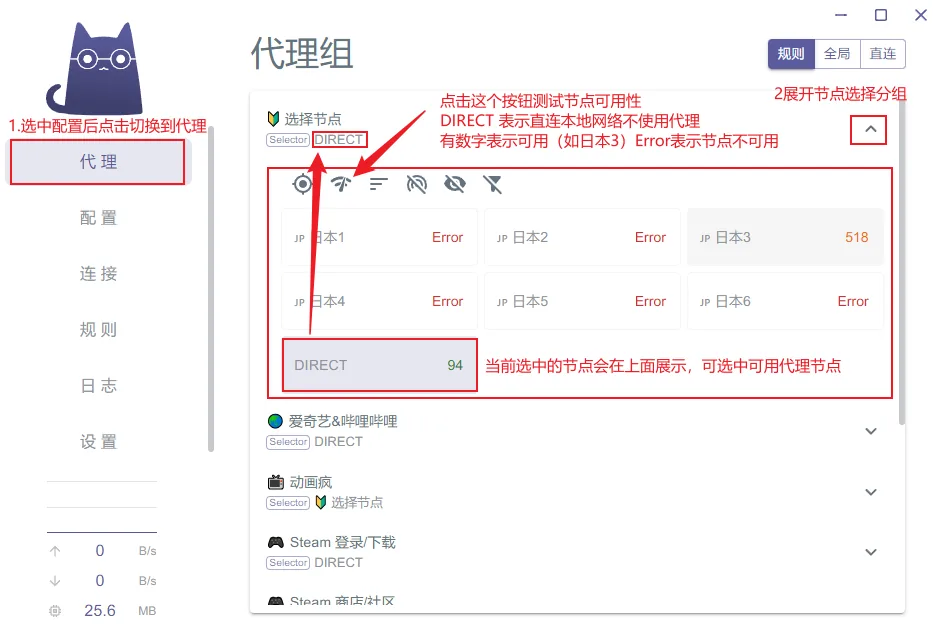
可能机场的节点信息有变动,更新一下节点配置信息,然后检测节点可用性,选一个可用的节点(节点名称后面有数值表示可用)。如果检测全部不可用,给机场提工单。
阅读
Частые вопросы и решение проблем Clash Verge
Частые вопросы
Не получается подключиться к международному интернету, внутренняя сеть работает нормальноВозможно, информация об узлах сервиса изменилась. Обновите конфигурацию узлов, затем проверьте доступность узлов и выберите доступный (число после имени узла означает доступность). Если все узлы недоступны, обратитесь в поддержку сервиса.
Все сети недоступны, компьютер остался без интернетаВозможно, это из-за незавершённого выхода из Clash Verge. Перезапустите Clash Verge, чтобы проверить, решит ли это проблему.
阅读
Clash Verge GitHub 官方仓库与 Releases 下载(clash-verge-rev)
很多用户搜「Clash Verge GitHub」「Clash Verge 官网」,想确认自己下载的是不是正版。本文整理官方仓库地址、Releases 下载方法,并教你辨别钓鱼站。
阅读Clash Verge Latest Download (Windows / macOS / Linux)
This content includes 👉🏻: ✓🐈 Client Download, ✓👩🏫 Usage Tutorial, ✓🔢 Netflix Account
Currently Clash Verge Rev latest version is v2.5.1. Code name: Yu Code name meaning: “Yu”, symbolizing control and protection, implying this version’s comprehensive mastery and improvement of system stability, security and user experience.
Client Download
⭐Clash Verge Download Download complete and ready to install.
Do not install in Chinese directory, do not install in Chinese directory, do not install in Chinese directory