Clash Verge 标签下的文章

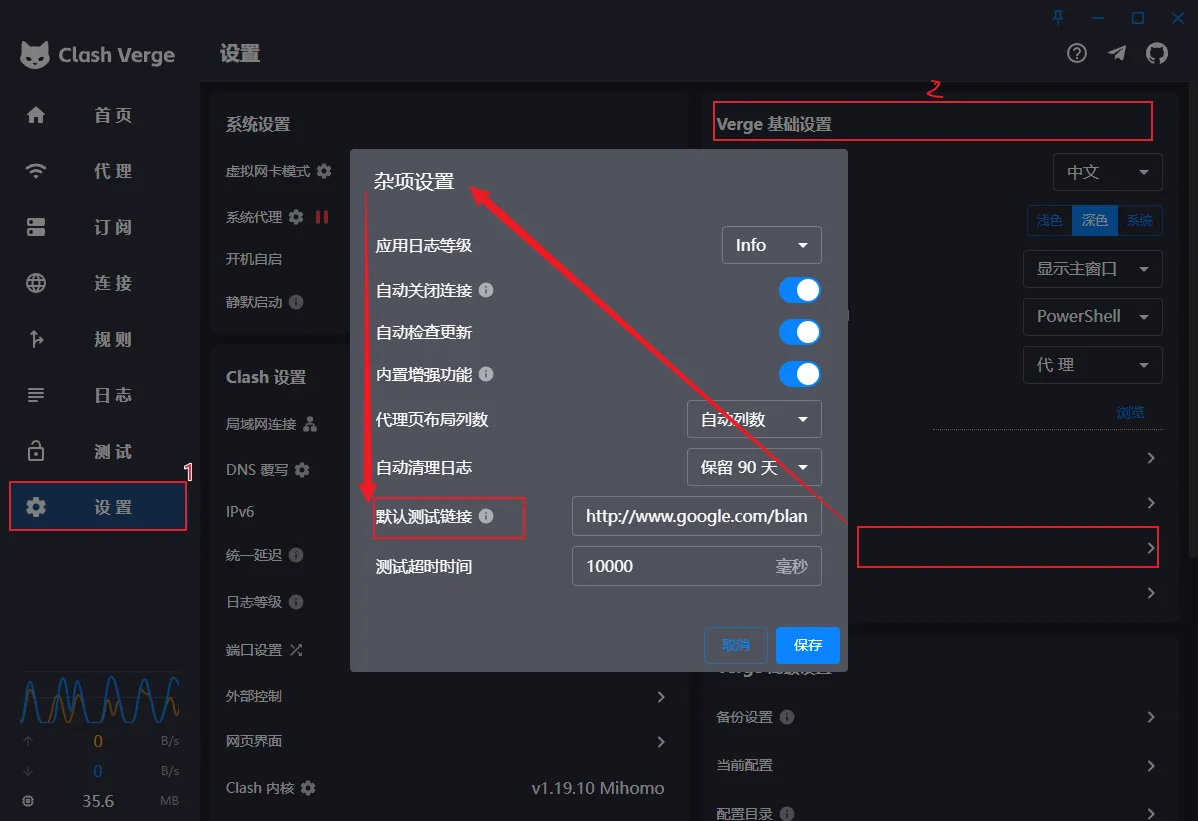
Clash Verge 204 Test URLs for Node Latency Measurement

Clash Verge 204 Test URL

Test URL for Clash Verge

This page provides test URLs for checking Clash Verge proxy connectivity.

Test URLs

The following URLs return HTTP 204 status code and can be used to test proxy connectivity:

  • http://www.gstatic.com/generate_204
  • http://clients3.google.com/generate_204
  • http://connectivitycheck.gstatic.com/generate_204

Usage

  1. Open Clash Verge
  2. Go to Proxy tab
  3. Click Test Latency button
  4. The test will use these URLs to check connectivity

Manual Testing

You can also test manually using curl:

阅读

Clash Verge FAQ and Troubleshooting

Clash Verge FAQ

What protocols does Clash Verge support?

Clash Verge supports multiple proxy protocols including:

  • Shadowsocks (SS)
  • ShadowsocksR (SSR)
  • Socks
  • Snell
  • V2Ray
  • Trojan
  • HTTPS

The interface is incomplete and I can’t operate it?

Delete the config.yml file in the software’s main directory and restart the software.

How to enable TUN mode?

  • Windows: Run as administrator or install service mode
  • macOS/Linux: In settings, click the gear icon next to Clash kernel, then click “Authorize”

How to check the IP after enabling proxy?

You can check your IP address after enabling proxy at What is my IP

阅读

Clash Verge Node Configuration: SS, SSR, V2Ray, Trojan

Node Configuration Guide

Understanding Nodes

Nodes are proxy servers that route your internet traffic through different locations. Clash Verge supports various types of nodes:

Node Types

  1. Shadowsocks (SS): Encrypted proxy protocol
  2. ShadowsocksR (SSR): Enhanced version of SS with additional features
  3. V2Ray: Advanced proxy protocol with multiple transport methods
  4. Trojan: Protocol designed to bypass deep packet inspection
  5. HTTPS: Standard HTTPS proxy

Adding Nodes

  1. Get your subscription URL from your proxy provider
  2. Open Clash Verge
  3. Go to Profiles tab
  4. Click New ProfileURL
  5. Paste your subscription URL
  6. Click Download

Method 2: Manual Configuration

  1. Go to Profiles tab
  2. Click New ProfileFile
  3. Create a YAML configuration file
  4. Add your node configurations

Example Configuration

proxies:
  - name: "US Server"
    type: ss
    server: us.example.com
    port: 8388
    cipher: aes-256-gcm
    password: your_password
  
  - name: "UK Server"
    type: trojan
    server: uk.example.com
    port: 443
    password: your_password
    sni: uk.example.com

proxy-groups:
  - name: "Proxy"
    type: select
    proxies:
      - "US Server"
      - "UK Server"
      - "DIRECT"

  - name: "Auto"
    type: url-test
    proxies:
      - "US Server"
      - "UK Server"
    url: http://www.gstatic.com/generate_204
    interval: 300

Testing Nodes

  1. Latency Test: Click the Test Latency button to check server response times
  2. Connectivity Test: Use the built-in test URLs to verify connectivity
  3. Real-world Testing: Visit websites to confirm the proxy is working

Managing Nodes

  • Enable/Disable: Toggle individual nodes on/off
  • Reorder: Drag and drop to change node priority
  • Delete: Remove unused nodes
  • Backup: Export your configuration for backup

Best Practices

  1. Multiple Providers: Use nodes from different providers for redundancy
  2. Geographic Diversity: Choose nodes from various countries/regions
  3. Regular Updates: Keep your subscription updated
  4. Performance Monitoring: Regularly test node performance
  5. Security: Use strong passwords and secure protocols

阅读

Clash Verge Official Resources and GitHub Repository

Official Resources

GitHub Repository

  • Main Repository: clash-verge-rev/clash-verge-rev
  • Issues: Report bugs and request features
  • Releases: Download latest versions
  • Documentation: Official documentation and guides

Official Website

  • Website: clash-verge.com
  • Documentation: Comprehensive guides and tutorials
  • Downloads: Latest releases for all platforms

Community

  • Discord: Join the official Discord server
  • Telegram: Follow official announcements
  • Reddit: Participate in discussions at r/ClashVerge

Development

  • Contributing: Guidelines for contributing to the project
  • Translations: Help translate Clash Verge into your language
  • Testing: Beta testing programs for new features

Support

  • Wiki: Detailed documentation and troubleshooting
  • FAQ: Frequently asked questions
  • Contact: Official support channels

Mirrors

  • GitHub Mirror: Alternative download sources
  • CDN: Fast download mirrors worldwide

阅读

Clash Verge Official Tutorial in English: Download, Subscription & Config

Clash Verge Best Usage Tutorial and Download

This content includes 👉🏻: ✓🐈 Terminology Introduction, ✓👩‍🏫 Download Settings

Terminology Introduction

🚩Clash: A multi-platform proxy client developed in Go language. Github

🚩ClashX: Clash’s Mac GUI client. Github

🚩ClashForAndroid: Clash’s Android GUI client. Github

🚩Clash Verge: Clash’s Windows/macOS/Linux GUI client. Github

Clash-Verge supports three major platforms: Windows, macOS, Linux. It’s powerful and supports multiple proxy protocols such as Shadowsocks(SS), ShadowsocksR(SSR), Socks, Snell, V2Ray, Trojan, https and other proxy protocols.

阅读

Clash Verge Latest Download (Windows / macOS / Linux)

This content includes 👉🏻: ✓🐈 Client Download, ✓👩‍🏫 Usage Tutorial, ✓🔢 Netflix Account

Currently Clash Verge Rev latest version is v2.5.1. Code name: Yu Code name meaning: “Yu”, symbolizing control and protection, implying this version’s comprehensive mastery and improvement of system stability, security and user experience.

Clash verge dark-light mode

Client Download

⭐Clash Verge Download Download complete and ready to install.

Do not install in Chinese directory, do not install in Chinese directory, do not install in Chinese directory

阅读